
Dashboard
Unified view of your entire payment stack, across all providers, payment methods, and transactions. Set up monitoring and alerts to stay ahead of issues, trigger workflows to automate decisioning, define access controls and push data with webhook API support. It’s everything you need to manage and optimize payments, all in one place.
We have you covered
Some of our features for this product explained in full here
Consolidated view
Your entire payment stack, finally in one place
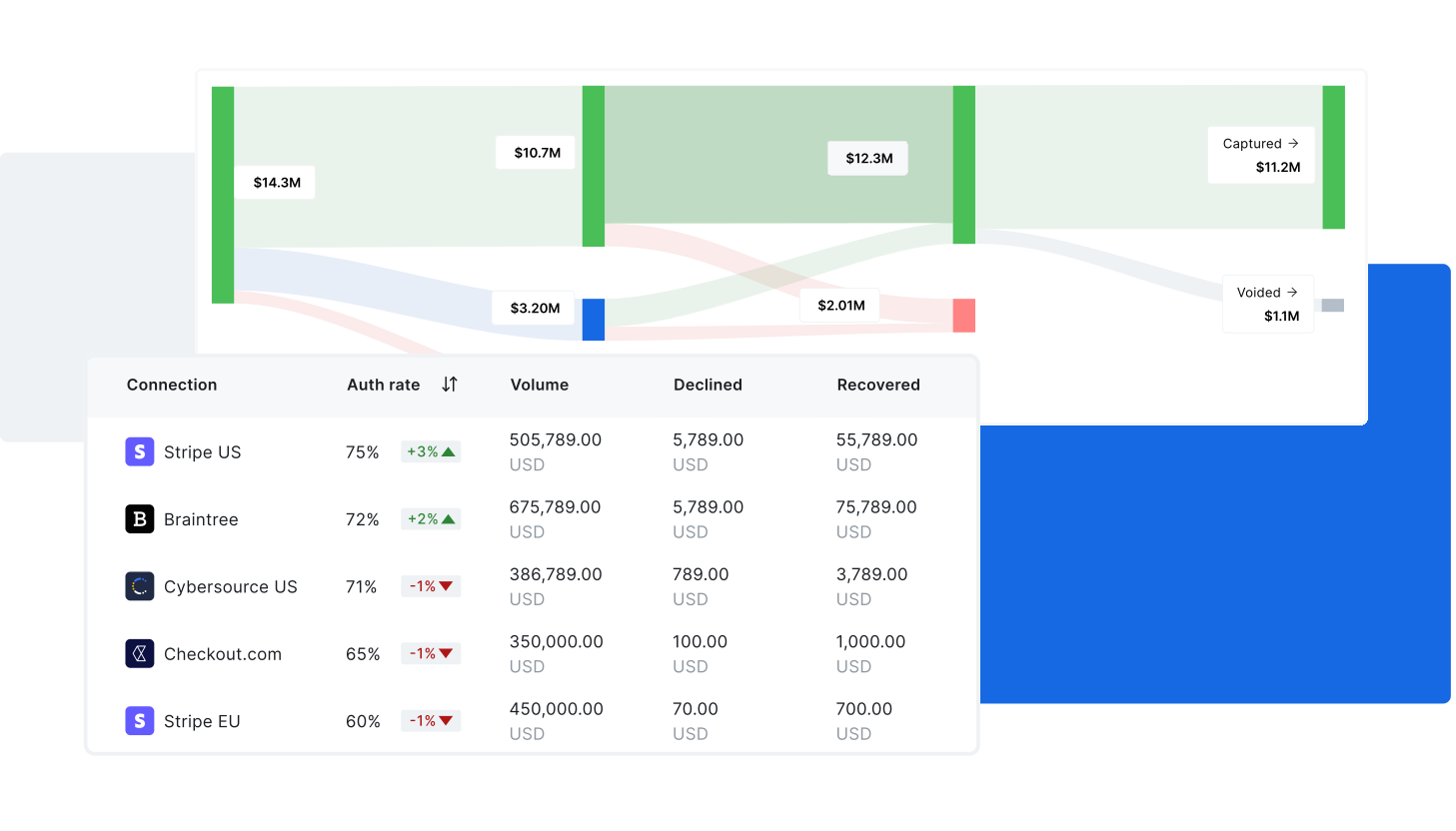
Gr4vy’s consolidated view brings all your payment data together in one intuitive dashboard, no more switching between platforms or piecing together reports. With a single source of truth, you can manage your stack more efficiently, spot trends quickly, and make smarter decisions in real time.
Transactions
Visibility into every transaction
Quickly filter and drill down by amount, currency, PSP, and transaction status, so you can monitor performance, identify issues, and take action without digging through disconnected systems. Whether you’re tracking trends or troubleshooting a failed payment, the data you need is always at your fingertips.
Connections
Turn connections on or off with no code
Complete visibility and control over every active connection in your payment stack. Instantly see which PSPs and services are live, and enable or disable connections with a single click, no redeployments, no downtime. Whether you’re adding a new provider, testing a backup, or responding to market shifts, managing your payment infrastructure has never been this simple.
Explore our connections library >
Automate your payments, your way
Take control of the entire payment experience, from which options appear at checkout to how transactions are routed behind the scenes. Create rules directly in the dashboard to dynamically adjust the flow of card and non-card payments based on conditions like country, amount, currency, or custom metadata. Whether optimizing for cost, approval rates, or user preference, Gr4vy gives enterprises and platforms the flexibility to tailor outcomes in real-time, no-code required, with full API access for advanced configurations.


Monitoring & Alerting
Stay ahead
Configure custom alerts based on key metrics such as approval rates, transaction volume, error codes, and others. Whether you’re tracking sudden drops in performance or unusual spikes in declines, Gr4vy enables you to define thresholds and receive instant notifications via email or webhook. This proactive approach helps teams respond quickly to issues, reduce downtime, and maintain a resilient, high-performing payment stack, all without manual tracking.
Webhooks
Real-time data. Seamlessly delivered.
Receive real-time notifications whenever key events occur in the platform, such as transaction updates, settlements, or refunds. These notifications are delivered to HTTPS endpoints of your choice, making it easy to keep internal systems, tools, and workflows in sync. You can configure multiple webhooks URLs per instance and tailor subscriptions to specific merchant accounts.
Merchant Controls
Built-in access control for better governance and scale
Define granular user roles and permission levels to match your internal structure, whether it’s limiting access to sensitive data or restricting configuration changes. Tailor views for finance, operations, or engineering teams, ensuring every user gets the visibility they need, while maintaining security, compliance, and operational clarity across your organization.
Centralize, Analyze, Optimize
Gain full visibility into your payments performance
PAYMENT ORCHESTRATION
Explore other features



dashboard
FAQ
What is a payment dashboard and why is it useful?
A payment dashboard is a unified view of your entire payment stack. It consolidates transactions, provider connections, workflows, and settlement data into one interface. This visibility allows finance, operations, and technical teams to monitor performance, detect issues, and make real-time adjustments. Having all payment data in one place helps businesses scale faster while maintaining better control.
How does real-time monitoring improve payment performance?
With real-time monitoring, businesses can track transaction status, approval rates, and error codes as they happen. Alerts can be configured to notify teams of failed payments, provider downtime, or unusual activity. This proactive approach reduces revenue loss, speeds up troubleshooting, and improves overall reliability in the checkout process.
What role do webhooks and APIs play in a payment dashboard?
Webhooks and APIs push transaction data directly from the dashboard to other systems, such as ERP, CRM, or accounting platforms. This automation eliminates manual data entry, improves reporting accuracy, and ensures payment data flows seamlessly across business systems. For developers, webhook support also makes it easier to build custom integrations that respond to payment events in real-time.
How does a dashboard support governance and scalability?
A payments dashboard includes built-in access controls so different teams and roles can manage only the data and functions relevant to them. This strengthens compliance and security while supporting enterprise governance policies. As transaction volumes grow, a centralized dashboard makes it easier to oversee multiple PSPs, workflows, and integrations without adding operational complexity.